InchCalc is an Add-in for Microsoft Excel that makes it possible to do calculations in feet and inches. It is handy for architects, builders, and carpenters.
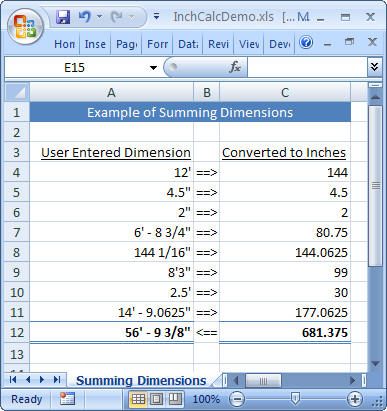
Here is an example spreadsheet showing how to sum a list of dimensions...
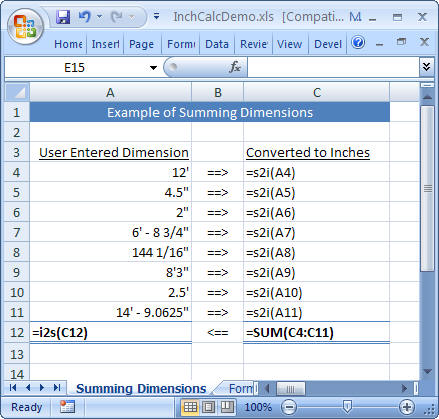
Here is what the formulas look like for the above spreadsheet...
For Excel 2010-2016
=i2s(12) in the first cell and press
enter!IMPORTANT UPDATE:
Microsoft changed how add-ins work in an update, so now you need to also follow the trust settings in the FAQ below!
For Excel 2007
 ,
and then click Excel Options.
,
and then click Excel Options. =i2s(12) in the first cell and press
enter!
For Excel 2000-2003
Click Browse, and then locate the InchCalc.xla add-in file that you downloaded above.
For Excel 2004 Mac
Click Select, and then locate the InchCalc.xla add-in file that you downloaded above and click Open.
InchCalc is now installed. The functions i2s() and s2i() should be available
just like any other Excel functions.
Click here to download and open the demo workbook
InchCalcDemo.xls in Excel and play with it! There
are three sheets in this workbook, be sure to look at them all.
InchCalc adds two new functions to Excel;
s2i() converts a displayable string showing inches and feet into a a number
of inches. The number of inches can be used in formulas and sums. For example,
the s2i() of 2' 6" is 30 because 2 feet + 6 inches = 30 inches.
i2s() converts a number of inches to a displayable string
showing feet and inches. For example, the i2s() of 145 is 12' - 1".
s2i() and i2s() are inverse functions, so i2s( i2s( 25 ) ) = 25.
Typically you will set up your spreadsheet so you can enter all your
measurements into a column of cells, then convert those measures into their
equivalent inches in an adjacent column with s2i(), then do all your
calculations in inches, and finally convert the answer in inches back to a
displayable form with i2s(). The best way to understand this is just open the
sample spreadsheet and just play around with changing the values and formulas.
It is very simple.
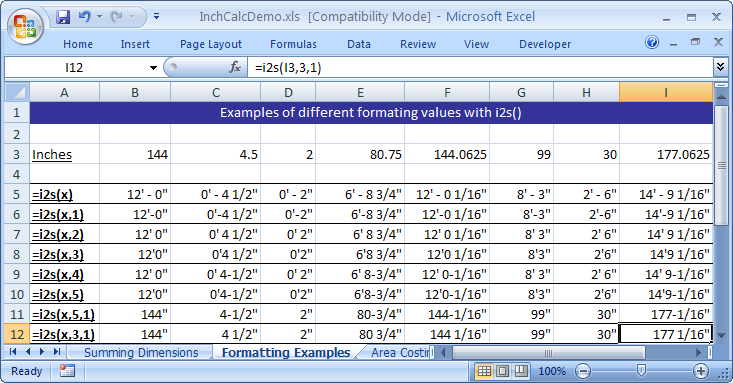
The i2s() function optionally supports a couple of different formats for the
generated string. You specify which format you want by adding a second argument
to the i2s() function call.
| i2s() Formats | |
| (default) | f'_-_i_n/d" |
| 1 | f'-i_n/d" |
| 2 | f'_i_n/d" |
| 3 | f'i_n/d" |
| 4 | f'_i-n/d" |
| 5 | f'i-n/d" |
f=feet, _=space, i=whole number of inches, n=numerator of fractional inches, d=denominator of fractional inches
Additionally, the i2s() function supports a second optional parameter that when specified as '1' suppresses the conversion of inches to feet, so the formatted value only includes whole and fractional feet.
The formatting demo spreadsheet below shows how different values look with the different formats...
The s2i() function is pretty flexible and will accept almost any reasonable
combination of feet, inches, fractions, decimals, spaces, and dashes. Note that
double quote character is a bit problematic in Excel since they usually surround a
text string. The easiest way around this is to put each dimension in its own cell and
reference those cells in your calculations rather than trying to type the
dimension directly inside a formula. If you have to put a dimension inside a
formula you can use the function char(34) to
generate a double quote. For example, s2i( "2' 6"+char(34) )
= 30. Or you could use the i2s()
function to generate the string.
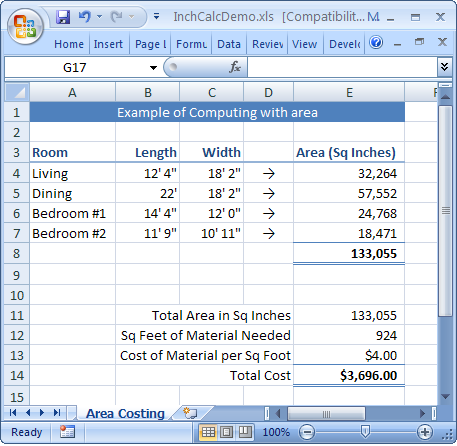
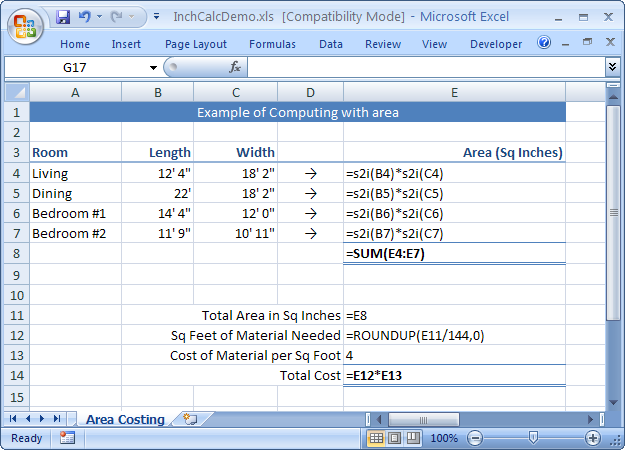
Here is an example of how you might do area-based costing calculations with InchCalc...
..and the formulas used...
If you have trouble downloading the add-in file and the sample spreadsheet from the links above, they are both inside the ZIP file below...
http://josh.com/InchCalc/InchCalc.zip
A couple tips form other InchCalc users. Send in yours!
http://josh.com/InchCalc/Gallery.html
Q: When I pull up the sample spreadsheet, all I see is #NAME everywhere!
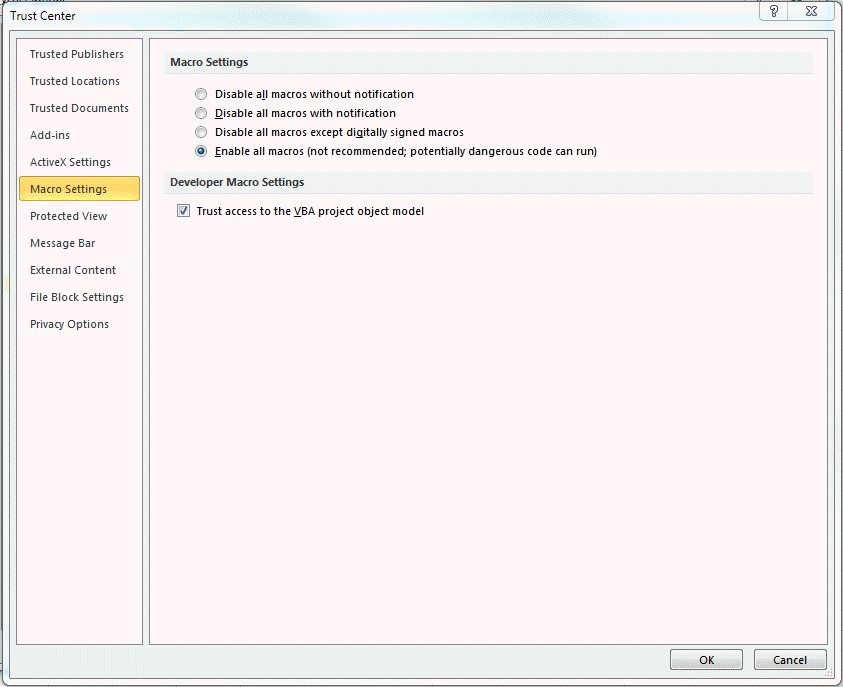
A: First make sure you installed the plug-in according to the instructions above. If so, try quiting out Excel and Restarting it. Next check your Macro settings. Try setting them to the most permissive possible just to see if that fixes it. If so, you can move then set the back to the most restrictive setting that still works.
6/16/17 - Helpful advice from David Meaux:
|
I figured it out. Windows 10 is really picky, apparently.
I opened both spreadsheets, then went into VB and copied the
module from yours into the other one.
Worked fine. |
3/20/2018 - Helpful advice from Jessye Ford:
I was having some mad issues with your program running
in Office 365 2016, here is an excerpt from a forum that I came across while
trying to figure out what was going on:
5down voteaccepted
This problem results from security patch in KB31152, released in
July 2016. According to private communication with Microsoft software
engineers:
"With this update, we changed the behavior of Excel so that it will
not load certain file types (including .xlam) when they are untrusted. The
easiest workaround is to find the add-in that is causing you trouble,
right-clicking on it in Windows Explorer, and checking Unblock"
An easier approach is to simply place the add-in in a Trusted
Location (in Excel, go to File > Options > Trust Center > Trust Center
Settings > Trusted Locations), such as the following folder, and load it
from there:
C:\Users\%USER NAME%\AppData\Roaming\Microsoft\Excel\XLSTART
Unfortunately, Microsoft failed to clearly document this major,
"breaking" change (as of this writing), leaving probably hundreds of
thousands (millions?) of Excel users wondering why their add-ins are not
loading. They did, however, bury some useful information about this issue in
a blog post:
Q: Why do I get values with lots of extra trailing decimal digits when I do conversions like =i2s(144.1)?
A: This is an inherent problem in Excel. Try typing
the following formula into Excel (any Excel spreadsheet, InchCalc *NOT*
required);
=1*(.5-.4-.1)
You might be very surprised to see that the answer is NOT zero.
I could make InchCalc hide this problem from you by rounding in the incoming
inches to, say, 10 decimal places but I generally prefer to have things fail
quickly and explicitly rather trying to hide the problem only to have it show up
unexpectedly in a seemingly unrelated cell.
You can read the Microsoft Knowledgebase article here;
h
Ultimately the solution is to not use decimals unless they are an even power of
two in the denominator (0.125 is ok, 0.100 is not).
This is not too much of a problem for InchCalc measurements since most people by convention specify inches in fractions since that it how ruler and other measuring tools work. Note that decimals are ok, as long as they are halves, quarters, eighths, sixteenths, etc. rather than tenths.
Maybe someday Excel will permanently solve this
problem by adding a Binary Coded Decimal data type. Most modern computer
programming languages have this (in
Java it is
called
BigDecimal). It is slow, but you never get decimal error creep.
Q: Does InchCalc support OpenOffice?
While it certainly would be possible to make a version of InchCalc that works with OpenOffice, I've found that most professionals use Excel. Additionally, OpenOffice's documentation for creating add-ins is not great, so it would be more difficult that it should be. That said, if there were enough people who really wanted it, I be happy to put in the effort.
Q: When I try to download the spreadsheet files, all I get is a text file full of garbage. What Can I do?
A: There are lots of things that can get in the way of you directly downloading Excel spreadsheets. These are usually put in place to block viruses. Try downloading the ZIP file instead, then extract the files form the ZIP onto your hard drive and open them from there.
Q: Is it possible to convert mm into feet & inches?
A: To convert, say, 1000mm into inches and feet, you could put the following to a cell…
=i2s( 1000 * 0.0393701 )
…which gives
3' - 3.3701".
(Note that there are 0.0393701 inches in a mm)
|
12/20/2006 |
|
|
01/24/2007 |
|
| 4/23/2007 |
|
| 8/26/07 |
|
| 2/2/20111 |
|
| 2/7/2011 |
|
| 7/29/2012 |
|
| 10/4/2017 |
|
If you have any problems or questions, you can email me at...

InchCalc is (c)2006 Joshua Levine. InchCalc is free to use. If you want to modify or sell InchCalc, or include it in your product, please email me and we can work something out.