
I've stopped using Mail-Filters.com because they started having an unacceptable number of false positives. I will not be maintaining this package any longer. Please email me if you have any questions.
Mail-Filters.com offers a compelling spam filter solution that is accurate (low false positive rates), effective (catches a large portion of spam), and reasonably priced. Read more about it at http://mail-filters.com.
The Mail-Filters.com's Windows SDK is based on a C++ LIB, which is difficult to access directly from Microsoft's latest Windows development tools like Visual Basic.NET, C#.NET, and J#.NET. This page documents a framework I've created around the Mail-Filters.com SDK to allow easy access from these .NET tools. It also includes some useful programs I've developed based on this framework.
Note that to use any of these tools you will need access to a running StarEngine (the Mail-Filters.com filtering engine) and a Mail-Filters.com activation key, which you can only get if you have a paid Mail-Filters.com subscription, available directly from them.
All of the necessary files with source code are included in this zip file...
MFDEV.ZIP
You may use this code for any non-commercial purpose as long as my copyright remains. Please email me first prior to using in a production environment so that I can keep you up to date on any changes that may happen. Also please email me first if you intend to use this code in a commercial product.
The interfaces higher on the list are based on the ones below them. It is likely that you will want to use one of the interfaces farther towards the top (more abstract) to make your life easier, but the full stack is presented for completeness.
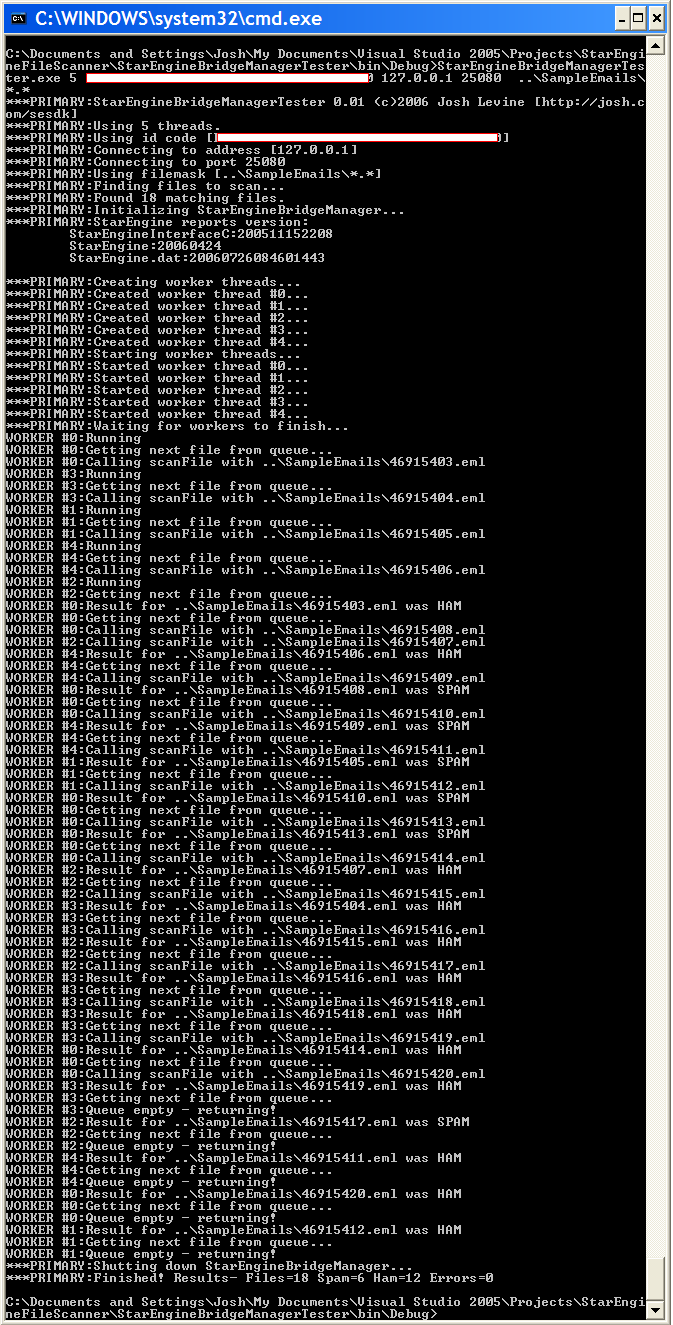
StarEngineBridgeManagerTesterA ready-to-run sample application that fully exercises the StarEngineManager class. You specify a set of emails files and the program reports the total number of SPAM and HAM messages found. Even includes a directory full of sample SPAM and HAM emails file to get you started. Usage: StarEngineBridgeManagerTester threads id address port filemask Where: threads specifies the number of simultainious scanning threads to use id is the Mail-Filters.com assigned id code to log into the StarEngine address is the ip address of the StarEngine server port is the listening TCPIP port of the StarEngine server path is a mask for the set of files to be scanned Example: StarEngineBridgeManagerTester 4 12344G-2123-213345-S34554 127.0.0.1 25080 *.eml Here is a screenshot of a sample run
|
StarEngineBridgeManagerA high-level access interface that completely abstracts the StarEngine SDK connection details and presents a very simple class-based interface for scanning emails. Internally it uses a pool of connections to the StarEngine to avoid the overhead of opening and closing connections on each scan. It is thread safe - if there are more open calls to scanfile() than there are available connections then the calling threads wait in a queue for their turn. The basic calling order is...
...that's it. public class StarEngineBridgeManager {
// Create a new set of connections to a StarEngine to use for scanning emails
//
// connectionCount - number of connections to open. Must not exceed the max number of connections specified in
// the StarEngine config file. More connections use more resources, but mean there is less chance a scan will get held in a queue waiting for a free connection.
//
// id - the Mail-Filters.com suppled login id for the specified StarEngine.
//
// serverAddress - the ip address of a StarEngine to connect to.
//
// port - the TCP/IP the StarEngine is listening on (specified in the listenAddressAndPort section of the
// StarEngine config file)
//
// timeout - how long to wait before giving up on a connection. Probably best to use default value.
//
// attempts - number of attempts when making a connection. Also probable best to use default.
public StarEngineBridgeManager(int connectionCount, String id, String serverAddress, int port, int timeout, int attempts) throws StarEngineBridgeManagerException;// Alternate Constructor with default values supplied for timeout and attempts public StarEngineBridgeManager(int connectionCount, String id, String serverAddress, int port ) throws StarEngineBridgeManagerException// Close all connections and shutdown. Any pending scanfile() calls will return with an exception.public void shutdown() throws StarEngineBridgeManagerException// Scan a file to see if it is SPAM // scansize - only look at a maximum of this many bytes into the email // Returns: true is spam public boolean scanfile(String filename, int scansize) throws StarEngineBridgeManagerException;// Alternate version with default value for scansize public boolean scanfile(String filename) throws StarEngineBridgeManagerException;// Returns a version string reported by the StarEngine that currently has the format... // // StarEngineInterfaceC:200511152208 // StarEngine:20060424 // StarEngine.dat:20060724014305067 // // The last line is the most interesting since it gives the UTC time of the last database update received. public String getVersionString() throws StarEngineBridgeManagerException;} |
StarEngineBridge
Here is the class interface... public class StarEngineBridge {
// Convert a return code from any of the StarEngineInterface functions
// int text based on defines contained in StarEngineInterfaceC.h

public static native String SEIC_Error_Text( int code );
// Convert a return code from any of the Windows Sockets functions // int text based on defines contained in WinSock2.h public static native String WSA_Error_Text(int code);// Starts up the WinSock library. Must be called before attempting to // start any connections via Start_Connection() // Returns 0 on success or use WSA_Error_Text() to get error returned. public static native int Call_WSA_Startup();// Allocate a fixed size table of connections to the StarEngine // Note that these connections must be initialized before use. // Returns 0 if success, or SEDLL_ALLOC_FAILED if not enough memory. public static native int Allocate_Connection_Table(int size);// Sets up a new SEIC connection using one of the pre-allocated entries in the table. // Must call Allocate_Connection_Table() first // index must be less than the size specified in Allocate_Connection_Table() // Returns 0 on success, or if <0 use SEIC_Error_Text() to get error message // Can also return... // SEDLL_INVALID_INDEX is index is greater than number of connections allocated in Allocate_Connection_Table() // SEDLL_ID_TOO_LONG if the id string is too long // SEDLL_ADDRESS_TOO_LONG if the address string is too long public static native int Start_Connection(int index, String id, String serveraddress, int serverport, int timeout, int attempts);// Scan a file that contains an RFC 822 email in it // Returns: // 1 = HAM // 2 = SPAM // 3 = NOT SPAM // // SEDLL_INVALID_INDEX = index is greater than the size specified in Allocate_Connection_Table() // // Or if <0 use SEIC_Error_Text() to get error message public static native int scanfile( int index , String filename, int scansize ); public final static int DEFAULT_SCAN_SIZE = 64000; public final static int SCANFILE_RET_HAM = 1; public final static int SCANFILE_RET_SPAM = 2; public final static int SCANFILE_RET_NOTSPAM = 3; public final static int VERSION_STRING_BUFFER_SIZE = 1000; // More than big enough for the current 3-line string // Gets a text string that includes the current version of the interface, the StarEngine, // and the rules file. // // Returns 0 on success, or if <0 use SEIC_Error_Text() to get error message // Returns SEDLL_INVALID_INDEX if index is greater than the size specified in Allocate_Connection_Table() public static native int versionCheck( int index , byte[] buffer , int bufferSize );// Shuts down a connection previously started with Start_Connection() // Note than the connection can be restrted again with Start_Connection() after it has been shutdown // Returns 0 on success or use SEIC_Error_Text() to get error message public static native int ShutDownConnection(int index);// Free any resouces that were allocated durring Allocate_Connection_Table() // Be sure that all connections have been shutdown first public static native void Free_Connection_Table();// Shutdown the WinSocket library. You should call this after you've shutdown all open connections. // Returns // 0 = no error // Use WSA_Error_Text() to get error message if not 0 public static native int Call_WSA_Cleanup(); } |
StarEngineInterfaceDLLThis is a very thin C wrapper over the SDK LIB file to turn it into a DLL and make it accessible from managed code. There is basically a one-to-one mapping of the calls in the SDK LIB file without any abstractions. These calls are exported from the DLL, so all calls into it must be set up as "extern DLL". Note that you need the LIB and H files from the SDK to compile this DLL, but the resulting DLL (included in the ZIP) is all you need to make calls from a a Visual Basic or C# project. Here is the header from the source file... // StarEngineInterfaceDLL.cpp // ========================== // (c)2006 Josh Levine [http://josh.com] // // This program exposes the C-based StarEngineInterfaceC.lib library as // as a minimally wrapped DLL so the functions can be called from .NET // // Note that you need the following files to build this program... // StarEngineInterfaceC.h // StarEngineInterfaceC.lib // Both files are from the StarEngine SDK available from Mail-Filters.com // // Calling order for using the DLL... // // A - Call Call_WSA_Startup() to initialize the Windows Sockets lib // B - Call allocateParamTable()with the maximum number of connections you will ever have // C - Call FillAndInitSEICStruct() for each connection before you use it // D - Call scanfile() and/or versionCheck()- but only one pending request per connection // C - Call ShutDownSEICStruct() for each connection when you are done using it // B - Call freeParamTable() to release the parameter table // A - Call Call-WSA_Cleanup() to shutdown Windows Sockets |
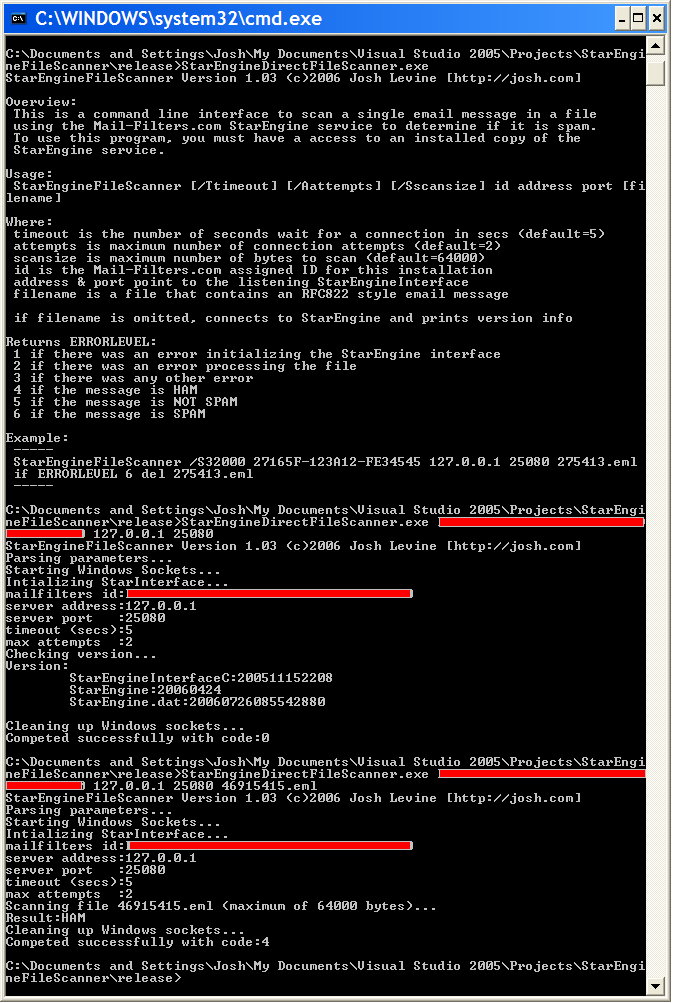
StarEngineDirectFileScannerThis is an example of bare-metal linked-in access to the C++ SDK LIB from C++. It can be used to test a StarEngine installation, and small and efficient enough to be used in a production environment if all you need is a command line way to test files for spamness. Here is the help screen from the program: This is a command line interface to scan a single email message in a file using the Mail-Filters.com StarEngine service to determine if it is spam.To use this program, you must have a access to an installed copy of the StarEngine service. Usage: StarEngineFileScanner [/Ttimeout] [/Aattempts] [/Sscansize] id address port [filename]Where: timeout is the number of seconds wait for a connection in secs attempts is maximum number of connection attempts scansize is maximum number of bytes to scan id is the Mail-Filters.com assigned ID for this installation address & port point to the listening StarEngineInterface filename is a file that contains an RFC822 style email message if filename is omitted, connects to StarEngine and prints version info Returns ERRORLEVEL: 1 if there was an error initializing the StarEngine interface 2 if there was an error processing the file 3 if there was any other error 4 if the message is HAM 5 if the message is NOT SPAM 6 if the message is SPAM Example: ----- StarEngineFileScanner /S32000 27165F-123A12-FE34545 127.0.0.1 25080 275413.eml if ERRORLEVEL 6 del 275413.eml |
I do not work for Mail-Filters.com, I am only a customer. I created this framework for my own use, but figured others might want it as well. By using it, you agree not to sue me.
Email me at...
You'll have to type it exactly as it appears above.
7/17/2006 - First published