Crashplan has been working ok, but it still has some rough spots and flakes. It occasionally just gets stuck and there is no obvious reason why. Reboot sometimes fixes it, but not always. I really want to find a rock solid backup so I never have to think about it again.
New year, so i decided to try BackBlaze. I *love* thier writeup on hard drive reliability. It is nice to see that they think hard about this stuff. Thier pricing model is also very generous at $5/mo for unlimited size.
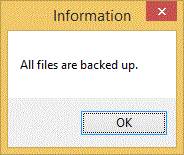
Unfortunately Backblaze disapointed me. The user interface is very simple - too simple infact. There is no way to figure out what is going wrong when something goes wrong. It gives very unhelpful feedback. Unpausing a backup that had been pause for a week give the message "All files backed up", which can not be true. Ocassional;ly it would popup a box saying "Subscription expired" and take me to web web page showing my non-expired supscription. Argh.
But the real deal breaker came when I went to restore an older version of my Outlook PST file - - which is the most important and most freqently updated local file on my system - and found that it was not in the BackBlaze system at all.
A search for "Outlook" in BackBlaze's support system brings up a page that assures...
Yes, Backblaze will backup your email if it is locally stored on your computer. Email applications like Outlook, Outlook Express, Apple Mail, Entourage, Thunderbird, Eudora will all have their email backed up.
Also, Backblaze will only backup the difference to the email database (PST,
DBX, Database, etc.) and will NOT re-upload the entire email database.
Maybe my backup My backup Maybe The app window was clear in its message...
Further, the app's "What is being backed up link?" brings you to a page with the title "Backblaze backs up all your data". Yet, clearly all my data was NOT backed up.
An email to BackBlaze support got a swift reply stating...
Backblaze cannot open files that are open, so if you are leaving
your PST file open at all times Backblaze will never be able to back it up.
Wow. The failure here is not that BackBlaze can not backup open files (although it really should). The failure is that it told me that it backed up all my files, but in fact did not. There is no way I could have know that my data was not actually being backed up if I had not happened to check.
Siliently not backing up data while explicitly stating that all data is backed up is about the biggest failure a backup program can have (short of deleting your local data!). You really need to trust your backup provider, and a huge mistake like this is just incompatable with my trust.
I am surprised that 10 years later, still no one can apparently get backup right. This is not that hard of a problem.
Backup coop used to show you a list of files that had not been backed up yet, sorted with oldest first. It didn't care why the file was not backed up - if the file on the local hard disk was different from the file on the backup - then the file was not backed up and you needed to know this. Fail-safe. You could set an alarm to let you know if the oldest no-backed-up-file was older than a certain ammount of time (say, 1 hour or 1 week) so you'd know for certain that if you lost everything at this moment, you would never loose more than the specified ammount of work.
Mozy recently changed their pricing causing my bill to go from $100/year to $1200/year.
It turned out to be a lucky break for me because it forced me to check out the other options.
I landed on CrashPlan. While I liked Mozy and it was good enough, CrashPlan is much better.
CrashPlan beats Mozy...
The install for CrashPlan is very clean. I used the "seed" drive option to do my initial backup and it worked brilliantly. They shipped the drive to me the same day, and the drive even comes with an addressed return label so it could not be easier.
Minor CrashPlan gripes..
Minor grips aside, CrashPlan is excellent software at an excellent price. Highly recommended!
Get it here..
This also looks almost exactly like BackupCoop...
Biggest downside seems to be no 64-bit support yet, but they say that is coming.
They also depend on VSS under Windows to do open files. I've never liked VSS, but it is better than nothing.
This looks very much like BackupCoop...
It seems to do good encryption, sends changes only, is fully automatic, and even backs up open files.
I've been using Mozy for two years now and it is basically perfect. Mozy now offers a free plan and an unlimited plan for less than $5 per month. This makes it pretty much a no-brainer for everyone. Any if you sign up using this link...

...I'll even donate the referral fee to The Aasha Foundation.
(Update- Use the code "MARCH" for an annual signup and save 10%)
PS: There is *one* thing I would change about Mozy that would make it absolutely perfect. Normally, once you install it Mozy just runs and automatically backs up your computer without you even need to know about. This is awesome, except in the (very rare) case when somehow Mozy get uninstalled or otherwise is not running. In this case, you have no good way to know that you are now NOT getting backed up any more. Alas, several months go by and you are blissfully ignorant that Mozy has not been running- until of course you need a file. This is very bad and I've actually seen it happen once.
Mozy could fix this very easily by just sending you an email if you have not completed a backup in the past, say, 5 days. This timeout could be configurable in the account profile. I know that they know the last time a user has successfully completed a backup because it already shows up on the website- it is just a matter of adding a process that check for stale backups and sends out emails. I've already begged them to do this several times. After you sign up, you should email them and tell them that you want this feature too.
That said, this is a VERY minor point and absolutely not an excuse for you not to install Mozy right now. If (when?) they do add this feature, you will automatically get it. In the meantime, all you need to do is look down at your systray once a week and make sure you see the Mozy logo running down there.
In addition to their standard free plan, you can now get up to 60GB of space from Mozy for about $100 per year. This pretty much eliminates my last complaint and makes Mozy damn near perfect. It also shows that Mozy actually listens to suggestions, which is another good sign.
So, I am officially retiring the BackupCoop project and urging all current BackupCoop fans to switch to Mozy.
I'll keep the BackupCoop source code backed up on CDs in my apartment just in case Mozy ever goes out of business and I need to start this project up again. :)
BackupCoop might now be obsolete!
Check out...
http://www.mozy.com/?ref=3f9a896b&kbid=39168&m=4&i=75
I think this service would do everything that BackupCoop would do for most people and it meets all BackupCoop's primary requirements. In many ways it is better than BackupCoop because it does not require you to give up any of your hard drive and will really work though any NAT configuration.
Give it a try and let me know if there is any reason to continue work on BackupCoop.
No one on earth does useful backups. I know because this summer I had four friends come to me to recover irreplaceable data from their crashed hard drives. Since then there have been six more.
No one does backups because it is too much of a hassle. Worse, some people
actually do backups, but their backup systems skip open files, so their most
important files never get backed up.
The world needs a backup solution that...
My original idea with backup coop is that when you sign up for the service, you
get assigned a backup-buddy in some other geographical region. Each night, you
send all your data to your buddy's hard drive and he sends all his to yours.
Everything is magically compressed, deltaed, and encrypted. Everything is
magically sent peer-to-peer. The only things you give up to use this service is
(1) one-for-one as much hard drive space as you want to use on the other
person's machine, and (2) some bi-directional bandwidth at night while you are
sleeping.
BTW: You can also have multiple buddies if you want more redundancy, all you
loose is some more bandwidth and hard drive space. You can also pick your own
buddies rather than having them assigned - for example, I'd pick my computer at
the farm to be buddies with my computer in NYC.
Perfect system, right? Everyone today has big hard drives with tons of free
room, but it is useless to them because backing up your hard drive to your own
hard drive is worthless. Everybody today has tones of unused bandwidth at night
too.
Name:
BACKUPCOOP.COM
Problem:
This summer I had to recover 6 (so far) hard drives for friends who had disk
crashes and had super important info on the drives and didn't do backups.
Idea:
Write a super-simple app that people can install with a click that will
automatically take care of backups for them with no external hardware or costs.
It also *must* be able to backup open files or else PST files never get backed
up.
How:
You decide how much data you need to backup -typically 10gb for stuff like My
Documents and a PST file. You tell program which files/dirs you want to backup.
Every night, it backs up your data too your backup-buddy's hard drive and backs up
his data to your drive. Total cost to you is 10GB hard drive space and some
bandwidth at night.
You can either pick your own partner machine (you could explicitly set up your
home machine to partner with your work machine), or have the system pick one
automatically based on your geographic location, backup set size, and network
connection type.
Everything is super encrypted. System never even knows your password (never
leaves your local machine), so everything is very safe. Once it is set up, you
never need to do anything else unless there is a problem. Pretty much the only
problem you can have is if you can't connect to the partner machine for x number
of days. It automatically gets past NAT using tricks, or finds a partner machine
that is not behind NAT as a last resort.
You can set up multiple relationships if you want redundancy.
Notes:
There is already something that is almost exactly right, but just not quite. It
doesn't do open files, it is not easy, and it requires that you give back 10x
the space you want to use.
The whole thing will be open source so other people can check that it really
does what it ways. Also hopefully people will set up a linux boxes with giant
hard drives in abandoned coal mines and will let you partner with them for a
fee. Other people will hopefully write Mac and Linux clients.
Sound good?
Links:
http://allmydata.com
Interesting, but not quite there yet. Makes a new drive rather than backing up
you existing data. Also, the 10x1 requirement seems to steep. Not sure how it
deals with open files.
http://www.carbonite.com/default.aspx
Only for photos and stuff like that. Looks great, but not free and probably does
not deal with open files correctly.
http://www.techsoftpl.com/backup/index.htm
Not free. You have to have two computers, no way to use other peoples' hard
drives for diversity.
http://www.drivesnapshot.de/en/backup.htm
Not free and only backs up to local media, but good model for how to correctly
access open files.
http://ask.slashdot.org/article.pl?sid=05/07/22/187217&tid=198&tid=95&tid=4
Slashdot weighs in.
http://66.102.7.104/search?q=cache:-xN1AjFvKwIJ:rob.infinitepigeons.org/wiki/BackupCloud%3Fversion%3D7%26action%3DRelatedChanges+backup+cloud+rsync+torrent&hl=en&client=firefox-a
I'm not the first one to have this idea, but it seems like so far no one has yet
implemented it successfully.
https://secure.logmein.com/go.asp?page=products_backup
I love the LogMein remote control software, so maybe this will be good enough
that I don't have to write BackupCoop after all!
http://www.sparebackup.com/Products.aspx
Yet another service that looks like it might have the right ingredients, but at
$1.99/month/Gb it doesn't seem any better than what Mosy offers for free.